Buying Guides · aġġornat 2026-10-16
How Far Can a Security Camera See? Lenses, Resolution and Night Range Explained
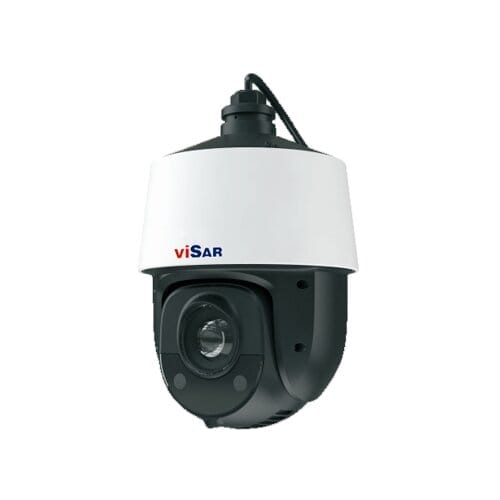
How far can a security camera see? It is the first question most people ask about a new camera — and the honest answer is that it depends on three things working together. A camera’s useful range is set by its lens (field of view and focal length), its resolution (how much detail lands on each metre of the scene) and, after dark, its night-vision reach. Get those three right for your site and a camera does its job; get them wrong and you end up with crisp footage of a car you cannot identify. Here is how to think about each one.
Field of view vs. distance: the lens trade-off
Every lens forces a trade-off between how wide it sees and how far it sees usefully. A short focal length (say 2.8 mm) gives a wide angle of view — great for covering a whole driveway or room, but distant objects shrink fast. A longer focal length (6 mm, 12 mm or more) narrows the view and magnifies the scene, letting you read detail much further away at the cost of coverage. So the question “how far can a security camera see” never has a single answer: a 2.8 mm lens might give a usable, identifiable image to roughly 10 m, while a 12 mm lens on the same sensor pushes recognisable detail out to 30 m or more within a narrower cone. Varifocal and PTZ cameras let you dial this in on site.
Resolution is really about pixels-on-target
More megapixels do not automatically mean “sees further” — what matters is how many pixels fall on the thing you care about, usually measured in pixels per metre (PPM). The security industry uses rough PPM bands: around 25 PPM to simply detect that something is there, about 62 PPM to recognise a known person, and 125 PPM or more to identify a stranger. A 4 MP camera spreads more pixels across the scene than a 2 MP one, so it holds identification-grade detail further out — but only within the area its lens covers. If you are weighing sensor resolution, our guide on how many megapixels you actually need breaks the bands down with examples.
Night range: infrared and the “IR cliff”
In daylight, range is a lens-and-resolution question. After dark it becomes a lighting question. Most cameras rely on built-in infrared (IR) LEDs, and makers quote an “IR range” — 30 m, 50 m, 150 m and so on. Treat that figure as a best case: IR falls off sharply with distance (the inverse-square law), so a subject at the very edge of the rated range will look dim and grainy. Wide-angle lenses spread IR thinly too, shortening effective night reach. If colour after dark matters, spotlight or full-colour cameras change the picture entirely — our explainer on infrared vs colour night vision covers when each is worth it.
Weather, mounting and the real-world limit
Two identical cameras can have very different range on site. Rain, fog and dirty glass scatter both light and IR; a camera aimed into a bright streetlight blooms and loses distant detail. Mounting height and angle matter as well — too high and you capture the tops of heads, not faces. An exposed long-range camera also has to survive the elements, which is where our guide on IP ratings and weatherproofing comes in.
Matching range to the job
Work backwards from what each camera must achieve. For a gate or till where you need to identify faces, choose a longer lens and enough resolution to hold ~125 PPM at that distance. For a general overview of a yard, a wide 2.8 mm camera is fine — just do not expect to read a number plate at the far fence. For long driveways or perimeters, a varifocal or PTZ model lets you zoom in on install. Browse weather-rated IP cameras and PoE cameras, or plan a full system from the video surveillance range.
The short version: how far can a security camera see?
A camera’s range is a balance of lens (wide vs. far), resolution (pixels-on-target) and night-vision reach — bounded by weather and mounting. So how far can a security camera see in practice? As far as the job needs: decide the distance and the task (detect, recognise or identify) for each position first, then choose the lens and resolution that deliver it. That is how you avoid footage that shows everything except the detail you actually needed.
 Buying GuidesMotion Detection Zones and Privacy Masks: Setup Guide
 Buying GuidesSecurity Cameras for Holiday Homes and Cottages: Setup Guide
 Buying GuidesSecurity Cameras in Winter: Cold Weather Tips and Fixes