Buying Guides · bijgewerkt 2026-10-16
Continuous vs Motion Recording on Security Cameras Explained
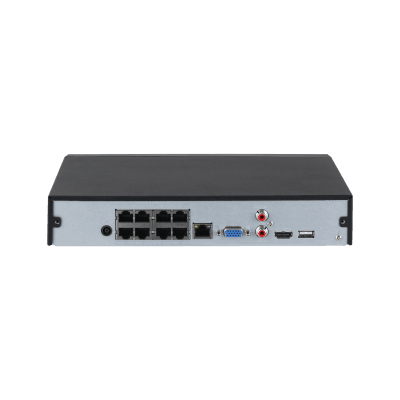
Every security camera has to decide when to record. Some capture everything, around the clock. Others save a clip only when something moves. The choice sounds minor, but it affects how much storage you need, how long a battery lasts and how likely you are to have the footage you want when something happens.
The Main Recording Modes
Most cameras and NVRs offer three basic options:
- Continuous recording: the camera writes video non-stop, 24 hours a day.
- Motion or event recording: video is saved only when the camera detects motion, a person, a vehicle or another trigger.
- Scheduled recording: the camera follows a timetable, for example continuous at night and event-based during the day.
Which of these you can use depends on the camera and where it stores footage. Mains-powered PoE cameras connected to an NVR handle continuous recording easily. Battery and solar cameras are usually built around event recording, because constant recording would drain them quickly.
Continuous Recording: Complete but Demanding
Continuous recording gives you an unbroken timeline. If you need to know what happened at 03:12, you can scrub straight to that moment, even if the camera never flagged anything.
This matters in situations where motion detection could miss something:
- A slow-moving subject, such as someone walking directly towards the lens.
- Small changes, such as a parcel being taken or a gate being left open.
- Incidents you only notice days later.
The trade-off is storage. A camera recording constantly writes data all day, whether or not anything is happening. A modern 4MP camera using H.265 might produce somewhere in the region of 20 to 40 GB per day, depending on bitrate, scene complexity and frame rate. Multiply that by several cameras and a 30-day retention goal, and you can see why an NVR with a surveillance-grade hard drive is the usual partner for continuous recording.
Motion Recording: Efficient and Easier to Review
Event recording saves only the moments that matter. That stretches a microSD card or hard drive much further and makes reviewing far quicker: you scroll through a list of clips rather than hours of an empty driveway.
Its weakness is that you depend on detection. If the camera does not trigger, nothing is saved. Common causes of missed or poor clips include:
- Sensitivity set too low for the distance involved.
- Detection zones that do not cover the entry route.
- A slow trigger on a battery camera that is waking from sleep.
- Poor night lighting reducing the contrast the sensor relies on.
Modern cameras with person, vehicle and animal detection are much better than old pixel-based motion detection. They also cut false alerts from trees, shadows and rain, so your clip list stays meaningful.
Pre-Recording and Why It Matters
A common worry with motion recording is that the clip starts after the trigger and you miss the first seconds. Many NVRs and some cameras solve this with a pre-record buffer, which keeps a few seconds of video in memory and attaches it to the start of the event clip.
Check the specifications or settings for pre-record or pre-event options. Not every model offers it, and battery cameras often handle it differently because of power limits. If you rely on motion recording for an entrance, a camera or recorder that includes the moments before the trigger is a real advantage.
How Your Storage Type Affects the Choice
The best mode often follows from where the video is stored.
NVR with a hard drive
This is the strongest setup for continuous recording. Surveillance-rated drives are designed for constant writing, and you can size the capacity to the number of cameras and days you want to keep. A hybrid approach also works well: continuous on the key cameras, event-based on the quieter ones.
microSD card in the camera
Cards can record continuously, but constant writing wears them faster. A high-endurance card helps, and event recording extends its life and its usable history. Whichever mode you pick, check the card occasionally to make sure it is still recording properly.
Battery, solar and 4G cameras
These are designed for event recording. Waking only on motion saves battery, and on 4G models it also saves mobile data, since only triggered clips are uploaded or streamed. Tight detection zones and sensible sensitivity make a noticeable difference to both.
Using Schedules and Hybrid Setups
You do not have to choose one mode for every hour of the day. Scheduling lets you match recording to risk. Some practical examples:
- Home entrance: event recording during the day, continuous overnight.
- Shop or workshop: continuous during opening hours, event recording when closed.
- Driveway or garden: event recording only, with person and vehicle detection.
- Remote site on 4G: event recording with a tight zone, to protect data and battery.
If your recorder supports it, you can also set different modes per camera, which keeps storage under control without losing coverage where it counts.
Quick Guide: Which Mode to Choose
- Do you have an NVR with a large drive? Use continuous recording on important cameras and event recording elsewhere.
- Is the camera battery or solar powered? Stick with event recording and fine-tune detection zones.
- Are you relying on a microSD card? Prefer event recording, and use a high-endurance card.
- Is the area high risk or legally sensitive? Favour continuous recording so nothing depends on a trigger.
- Are you getting too many alerts? Switch on person and vehicle detection before reducing coverage.
Conclusion
Continuous recording gives you completeness, motion recording gives you efficiency, and a schedule lets you have both. For most homes, the practical answer is a mix: continuous on the cameras covering doors and valuable areas, event recording on the rest, and event-only for anything running on a battery. Once you have chosen, test it. Walk through the scene at night and in daylight, check that clips appear with the right detail, and adjust sensitivity and zones until the footage you need is reliably there. Remember too that cameras covering public spaces or neighbours’ property may be subject to local privacy rules, so keep your retention period sensible.
 Buying GuidesMotion Detection Zones and Privacy Masks: Setup Guide
 Buying GuidesSecurity Cameras for Holiday Homes and Cottages: Setup Guide
 Buying GuidesSecurity Cameras in Winter: Cold Weather Tips and Fixes