Buying Guides · ažurirano 2026-10-23
Security Camera Brackets: Corner, Pole and Junction Box Mounts
Why the Bracket Matters More Than You Think
Most people spend hours choosing a camera and a few seconds thinking about how it will be attached to the building. The bracket decides where the camera can physically go, which angle it can reach, how well the cable connection is protected from rain and how easy the camera is to steal or knock out of position. A good camera on the wrong mount can end up looking at the gutter, collecting water in its cable connection or slowly drooping in the wind.
The standard base supplied with most bullet, turret and dome cameras works well on a flat wall or ceiling with the cable coming straight out of the surface. Once you need to fit a camera on a corner, a lamp post, a gate pillar or a facade where the cable cannot go through the wall, you need an accessory bracket. This guide explains the main types, when to use each one and how to keep the installation dry through the autumn rain and the winter ahead.
Wall Mounts, Extension Arms and Ceiling Mounts
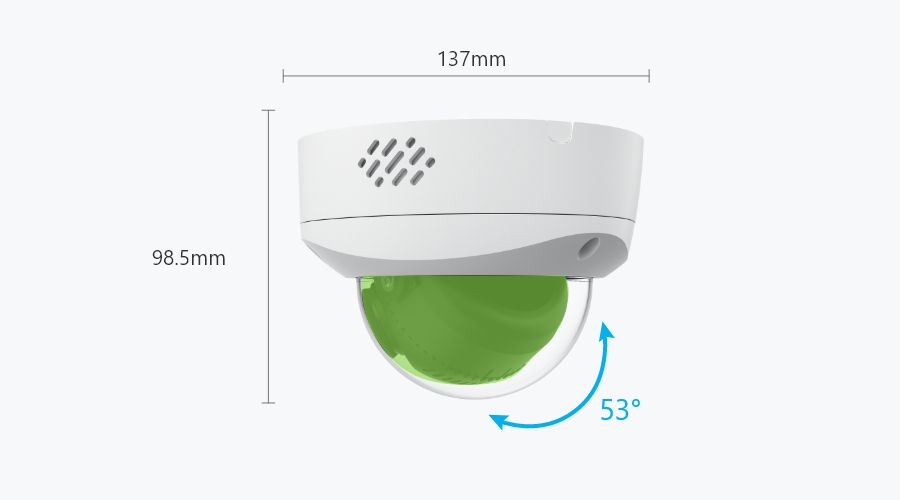
A wall mount bracket holds the camera away from the wall on a short arm. It is the classic choice for dome cameras on a vertical surface. A dome fitted straight to a wall without a bracket would mostly look at the wall or the ground. Wall arms are also useful for bullet and turret cameras when the eaves, a drainpipe or a window frame would otherwise block part of the view.
Longer extension arms are useful when you need to look along a wall, for example down the side passage of a house or along a row of garage doors. Keep in mind that a longer arm acts as a lever. Wind, snow load and vibration have more effect, so use solid fixings and avoid flimsy arms for heavier cameras such as PTZ models.
Ceiling and pendant mounts suit carports, covered entrances, warehouses and shop interiors. A pendant mount drops the camera below beams or suspended ceilings so it can see over shelving or vehicles. Under a canopy the camera is also partly protected from rain and direct sunlight, which helps image quality and reduces cleaning.
Corner Mounts: Covering Two Sides at Once
An external corner of a building is one of the best camera positions on a typical house. One camera can watch two sides of the building at once. The problem is that the corner itself has no flat surface to mount on. A corner mount bracket wraps around the external corner and gives a flat plate facing diagonally outwards. The camera then looks across both walls rather than along only one of them.
Corner mounts are especially useful for:
- Detached houses where the driveway and garden meet at one corner.
- Covering a side gate and the back garden with a single wide-angle camera.
- Small business units where the car park wraps around the building.
- Barns and outbuildings where you want to see two doors from one point.
Check that the corner is a true external corner of roughly 90 degrees. Most corner brackets are designed for that. Also look at what is already on the corner. Downpipes, render beads and timber cladding trims can stop the bracket from sitting flat. On cladding, it is often better to fit a small timber batten first so the bracket has a solid, even base.
Pole Mounts: Gates, Posts and Open Ground
When there is no building in the right place, a pole mount lets you attach a camera to a lamp post, flagpole, fence post or a dedicated steel pole. The most common design uses stainless steel band clamps that tighten around the pole, with an adapter plate that accepts the camera or a wall-mount arm.
Pole mounts are common for:
- Driveway entrances and gates, where a camera should capture faces and vehicles close up.
- Farms, paddocks and yards with no suitable wall nearby.
- Construction sites and storage compounds, often combined with 4G and solar-powered cameras.
- Car parks, where the camera needs height above parked vehicles.
Before you buy, measure the diameter of the pole and check it against the clamp range the manufacturer gives. Square timber posts usually work better with a flat wall bracket screwed directly to the post. Bear in mind that tall, thin poles sway in the wind. On a long zoom or a PTZ camera, even small movement shows up as shaking footage, so a sturdier pole or a lower mounting point is often a better choice.
Junction Boxes: The Key to a Dry, Tidy Install
A junction box (sometimes called a back box or connection box) sits between the wall and the camera. It gives the cable connectors a sheltered space when you cannot drill straight through the wall behind the camera. Instead of leaving the RJ45 plug, power connector and reset cable hanging under the camera, you tuck them inside the box. The cable enters through a side or bottom knockout.
Junction boxes help in several ways:
- Rain and condensation protection. Connectors stay out of the weather and away from driving rain, one of the most common causes of PoE and power faults outdoors.
- Tamper resistance. A thief or vandal cannot simply cut or unplug the exposed cable just below the camera.
- Neater surface wiring. On brick, stone or insulated facades you can run the cable in conduit straight into the box, with no long holes through the wall.
- Easier servicing. Swapping a camera later is quicker when the connections are in an accessible box.
Junction boxes are usually made for specific camera body styles and screw hole patterns. Always use the box or bracket the manufacturer lists as compatible with your camera model. A box that "nearly" fits will leave gaps that let water in. When you route the cable, make the side entry point downwards or add a small drip loop so water runs off before it reaches the gland.
Choosing Fixings for Your Wall
The bracket is only as strong as the fixings holding it. Many homes in northern Europe have mixed surfaces, so check what you are actually drilling into:
- Solid brick and concrete: standard wall plugs and stainless or coated screws are fine. Drill into the brick itself, not the mortar joint.
- Insulated render facades: the outer layer is thin render over insulation, which cannot hold a camera on its own. Use special insulation fixings or long anchors that reach the solid wall behind, and seal the drilled holes so moisture does not get into the insulation.
- Timber cladding and log walls: wood screws into a solid board or a fixed batten work well. Avoid fixing only into thin cladding boards, which can split or move with the seasons.
- Metal sheeting on sheds and halls: use suitable self-drilling screws or rivet nuts. Ideally fix into the frame rather than the thin sheet alone.
Whatever the surface, choose corrosion-resistant screws outdoors. Ordinary steel screws can rust and leave stains running down a light-coloured facade within one wet season.
Autumn Installation Tips for Rain and Cold
Late October is still a good time to finish outdoor installation before snow and hard frost arrive, but the weather calls for some care:
- Check the drip path. Look at where rainwater runs off the roof, gutters and window sills, and keep the camera and its cable entry out of that path.
- Seal holes properly. Use an outdoor-rated sealant and check its minimum application temperature on the packaging. Some sealants cure poorly in cold, damp conditions.
- Use the supplied waterproof caps. Fit the rubber seals and network cable covers supplied with the camera, then place the connection inside a junction box where possible.
- Think about snow and ice. Avoid positions directly under roof edges where icicles form or snow slides off, because both can knock a camera out of alignment.
- Plan for darkness. With long evenings ahead, test the view at night before tightening the bracket fully. Infrared light can reflect off a nearby wall, soffit or bracket arm and wash out the image.
- Re-tighten after a week. New fixings in timber and render can settle slightly. A quick check stops the image from slowly tilting.
Conclusion
The right bracket turns a tricky spot into a useful camera position. Use corner mounts to cover two sides of a building, pole mounts where there is no wall, wall arms and pendant mounts to clear obstacles, and junction boxes to keep connections dry and out of reach. Match every accessory to your exact camera model, choose fixings that suit the wall and finish the job before the worst of winter arrives. Your cameras will then stay pointed where they should, recording clearly through rain, frost and the long dark months.
Zatražite ponudu za ugradnju Prikaži sve: Nosači nadzornih kamera →
 Buying GuidesKamera ne snima na microSD karticu? Provjere i rješenja
 Buying GuidesReolink Home Hub objašnjen: središnja pohrana bez NVR-a
 Buying GuidesNadzorne kamere s dva objektiva: jesu li dva bolja od jednog?