Buying Guides · aktualizované 2026-10-16
How Many Security Cameras Do You Really Need?
One of the most common questions we hear from customers isn’t which camera to buy, but how many they actually need. Buy too few and you’ll have blind spots exactly where something happens. Buy too many and you’ll be paying for storage, PoE ports and NVR channels you never use. This guide walks through a practical way to work out the right number for your property.
Why one camera rarely does the job
A single camera above the front door feels like a good starting point, and it’s certainly better than nothing. But most break-ins and incidents don’t happen at the front door. Side gates, back gardens, driveways and garages are all common entry points that a single camera simply cannot see. Think of one camera as covering one problem, not the whole property.
Before buying anything, walk around your home or business from the outside and note every point where someone could realistically approach unseen. This list, more than any spec sheet, should drive your camera count.
Start with entry points, not rooms
For most homes, the priority order looks like this: front door, back door or patio door, garage or side access, and driveway. These are the places people actually use to get in and out, legitimately or otherwise. A camera watching a blank side wall adds little value compared with one covering a gate that’s actually used.
Once entry points are covered, look at valuable or vulnerable areas: a shed with expensive tools, a car parked outside rather than in a garage, or a garden gate that leads to a public footpath.
Overlap matters more than people expect
Two cameras with slightly overlapping fields of view are often more useful than two cameras placed to cover the maximum possible area with no overlap at all. Overlap means that if one camera’s view is blocked, obscured by weather, or its night vision struggles in a particular spot, the other camera picks up the gap. It also helps when identifying a person or vehicle, since you get footage from two angles rather than one.
A simple rule of thumb: for a detached house, plan for at least one camera per side of the building, with the front and back typically getting a slightly wider or higher-resolution camera since they see the most activity.
Indoor cameras: fewer, but targeted
Indoor coverage tends to need far fewer cameras than outdoor coverage, and it’s worth being deliberate about where they go. A hallway or stairwell camera often covers movement between rooms better than several cameras scattered around individual rooms. Many households add one indoor camera near the main entrance and, if needed, one covering a home office or a room with valuables.
Bear in mind that indoor cameras raise different privacy considerations than outdoor ones, particularly in shared households or rental properties, so it’s worth thinking about who else uses the space before installing one.
Matching camera count to your recording setup
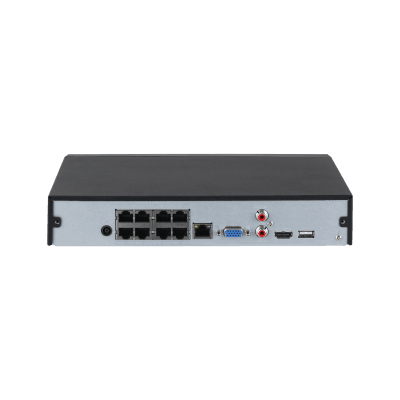
The number of cameras you want isn’t just a coverage question, it also affects your recording hardware. If you’re using an NVR, the channel count sets a hard limit, so it’s worth planning slightly ahead rather than buying an NVR that exactly matches your current camera count. Wi-Fi and 4G cameras that record to microSD or the cloud aren’t limited by channels, but adding many of them can strain your home broadband or mobile data allowance, especially if they all record continuously rather than on motion.
A mixed approach works well for many households: PoE cameras for fixed, permanent coverage of entry points, combined with one or two battery or Wi-Fi cameras for spots that are harder to wire or that might move in future, such as a shed or a temporary parking area.
Typical camera counts by property type
These figures are starting points rather than rules, but they reflect what most customers end up settling on after living with their system for a while.
- Flat or apartment: one camera at the main entrance, plus a video doorbell if permitted by the building.
- Terraced house: two to three cameras, typically front door, back garden and side passage.
- Semi-detached or detached house: four to six cameras covering front, back, both sides and the driveway.
- Small business or shop: four to eight cameras depending on the number of entrances, tills and stock areas.
- Rural property, smallholding or farm: six or more cameras, often combining PoE for buildings with 4G or solar-powered cameras for gates, outbuildings and boundaries.
Budget for growth from the start
It’s far cheaper to plan for expansion now than to redo your setup later. If you’re installing a PoE system, choose an NVR with a few more channels than you currently need, and run an extra cable or two while walls are already open. If you’re using Wi-Fi or 4G cameras, check how many devices your app and any cloud plan comfortably support before you commit to a particular brand.
Many customers start with two or three cameras covering the most obvious risks, then add more once they see which areas actually generate useful footage and which don’t. There’s nothing wrong with this staged approach, provided your recorder or app has room to grow.
Conclusion
There’s no single correct number of cameras for every property. The right count depends on how many genuine entry points and vulnerable areas you have, how much overlap you want for reliability, and how your footage will be recorded and stored. Start by mapping your entry points, prioritise overlap over sheer coverage area, and leave room in your NVR or app for future additions. A well-planned four-camera system will almost always outperform eight cameras placed without a clear strategy.
 Buying GuidesMotion Detection Zones and Privacy Masks: Setup Guide
 Buying GuidesSecurity Cameras for Holiday Homes and Cottages: Setup Guide
 Buying GuidesSecurity Cameras in Winter: Cold Weather Tips and Fixes