Buying Guides · atjaunināts 2026-10-21
Reolink Home Hub Explained: Central Storage Without an NVR
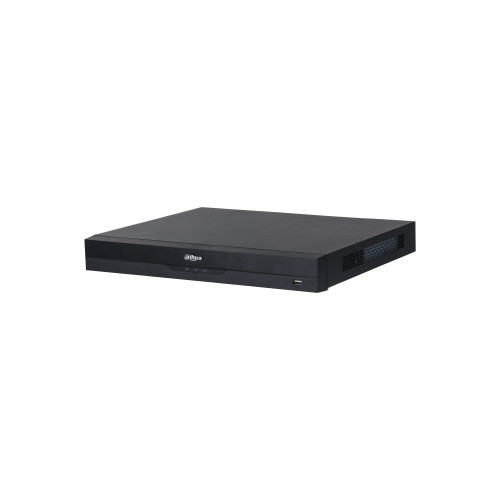
Many homes start with one or two Wi-Fi or battery cameras, each recording to its own microSD card. That works well at first. As the system grows, it becomes harder to manage. Footage is spread across several cards, and a thief can pull a camera off the wall and take the evidence with it. The Reolink Home Hub was designed for this situation. It gives Reolink cameras one central, local place to store recordings, with no subscription and no full NVR to install.
This guide explains what a home hub does and how it compares with the alternatives. It also covers how to set one up so it keeps recording through the long, dark months ahead.
What a Home Hub Actually Is
A home hub is a small indoor unit that sits on your home network and acts as the central point for your cameras. Recordings and settings are handled by the hub, so each camera no longer works as a separate island. You still view everything in the Reolink app on your phone or in the desktop client. The difference is that the cameras appear together in one place, and their footage is saved in one location.
The main benefits are:
- Centralised local storage: recordings from several cameras are saved in one place inside your home.
- Footage stays safe if a camera is stolen: the evidence is not inside the camera on the wall.
- No monthly fees: storage is local, so there is no need for a cloud plan.
- Simpler management: one device to check, update and back up.
Home Hub vs microSD Card in Each Camera
Recording straight to a microSD card is the simplest setup, and it is perfectly fine for a single camera. It has some clear weaknesses, though:
- If the camera is stolen or smashed, the card usually goes with it.
- Outdoor cards face frost, heat and constant rewriting. This is why high-endurance cards are recommended for cameras.
- Replacing or checking cards means climbing a ladder for every camera.
- Searching for an event means looking through each camera one by one.
With a hub, the storage sits indoors, in a stable temperature, out of a burglar's reach. You can still keep microSD cards in cameras that support them as a secondary copy if you want extra redundancy. The hub then becomes your main archive.
Home Hub vs NVR: Which Do You Need?
Both a home hub and an NVR store footage locally. They are aimed at different systems, however.
Choose an NVR when:
- You are installing wired PoE cameras. Many NVRs have built-in PoE ports that power the cameras through a single network cable.
- You want 24/7 continuous recording on several cameras to a large hard drive.
- You are planning a larger system for a business, a farm or a big property with many cameras.
Choose a home hub when:
- Your system is mostly Wi-Fi and battery cameras, possibly with solar panels.
- You want centralised storage without running cables to every camera.
- You prefer a compact device that sits quietly next to your router.
Keep in mind that a home hub does not supply PoE power. If you add wired PoE cameras later, you will still need a PoE switch or injector to power them. For a mixed system with many wired cameras, an NVR is usually the better long-term choice.
Which Cameras Work with It?
The hub is built for the Reolink ecosystem, and compatibility depends on the camera model and its firmware. Battery cameras, Wi-Fi cameras and many PoE cameras can be added. However, not every model supports every feature through the hub, such as continuous recording or certain smart detection functions. Before buying, check two things:
- That your existing cameras appear on Reolink's compatibility list for the hub you are considering.
- That the cameras and the hub are running the latest firmware, which often adds support and fixes.
Cameras from other brands such as EZVIZ, Imou, Hikvision or Dahua each use their own apps and recorders. Do not expect them to work with a Reolink hub. If you want to mix brands, an ONVIF-compatible NVR is the more flexible route.
How to Set Up a Home Hub Properly
Getting the basics right at the start saves a lot of trouble later.
- Choose the storage first. Check which storage the specific hub model accepts and how much capacity it supports. Use a high-endurance microSD card or a surveillance-grade hard drive. Ordinary cards wear out quickly under constant recording.
- Place the hub centrally. Wireless cameras need a good signal to send footage reliably. Put the hub and your router somewhere central and raised, away from thick walls, metal cabinets and fuse boards.
- Connect it with a cable if possible. Connecting the hub to the router with a network cable keeps the link stable and leaves Wi-Fi capacity for the cameras.
- Hide it sensibly. A burglar who finds the hub can take your footage. A cupboard or shelf out of sight, with ventilation, is better than a hallway table by the front door.
- Add cameras one at a time. Pair each camera, confirm it records to the hub, and test motion events before moving on to the next.
- Secure the account. Use a strong, unique password and enable two-step verification in the app.
Getting Ready for the Dark Season
Late October in northern Europe brings long nights, wet weather and the first frosts. All of these affect a camera system:
- More events, more storage: headlights, rain, falling leaves and early snow trigger more recordings. Review your detection zones and use person and vehicle detection. This keeps the hub from filling with useless clips.
- Battery cameras work harder: cold reduces battery capacity, and solar panels collect much less energy in winter. Recording to the hub does not change how often a battery camera wakes up. It is still worth reducing unnecessary triggers.
- Power cuts: autumn storms often knock out the electricity. Plugging the hub and router into a small UPS keeps recording and notifications working while battery cameras keep watching.
- Holidays away: before the Christmas period, check that the hub's storage is not full. Make sure overwrite is enabled, and confirm that remote viewing works from outside your home network.
Is a Home Hub Right for You?
A home hub is a sensible choice if most of the following apply:
- You already own, or plan to buy, several Reolink Wi-Fi or battery cameras.
- You want to keep footage even if a camera is stolen or damaged.
- You do not want a cloud subscription.
- Running network cables to every camera is impractical.
An NVR is usually the better fit if you are building a wired PoE system, need round-the-clock recording on many cameras, or are equipping a business with heavier demands.
Conclusion
The Reolink Home Hub fills the gap between a microSD card in every camera and a full NVR system. It brings Wi-Fi and battery cameras together, keeps recordings safely indoors and removes the need for cloud fees. Check compatibility before you buy, and use proper surveillance-grade storage. Place the hub where it gets a strong signal but stays out of sight. With those steps done, your cameras will be ready for the long winter nights ahead.
 Buying GuidesDivu objektīvu drošības kameras: vai divi objektīvi ir labāki?
 Buying GuidesNovērošanas kameras barošanas kabeļa pagarināšana: droši veidi
 Buying GuidesMotion Detection Zones and Privacy Masks: Setup Guide