Buying Guides · aktualisiert 2026-10-16
Was Sie bei einem NVR beachten sollten: Kanäle, Speicher und PoE-Anschlüsse erklärt
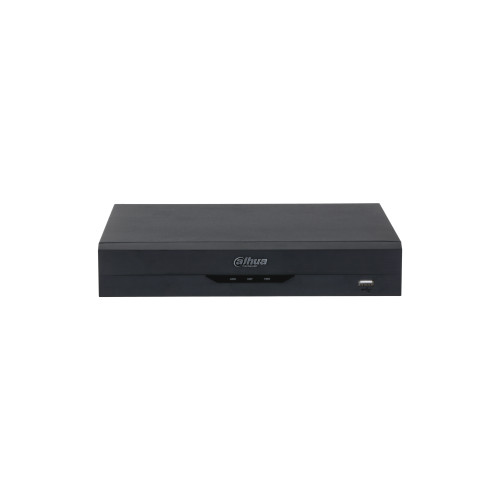
Ein Netzwerk-Videorekorder ist das stille Arbeitstier eines modernen Kamerasystems. Die Kameras bekommen die Aufmerksamkeit, aber der NVR entscheidet darüber, wie viele Sie betreiben können, wie viele Tage Aufnahmen Sie speichern und wie unkompliziert das ganze System zu handhaben ist. Dieser Leitfaden führt Sie durch vier Punkte, die wirklich wichtig sind, wenn Sie Recorder vergleichen: Kanäle, Speicher, PoE-Anschlüsse und Kompatibilität.
Was ein NVR wirklich tut
Unlike an old-style DVR, which digitises analogue signals, an NVR receives video that the IP cameras have already encoded. Its job is to ingest those streams over the network, write them to disk continuously or on motion, and serve them back to you through a monitor, a mobile app or a web interface. Because the heavy lifting of encoding happens in the camera, the recorder’s real limits are bandwidth, decoding power and disk throughput – which is exactly what the specifications below describe.
Channels: buy headroom, not just today’s cameras
The channel count is the maximum number of cameras the recorder will accept, and typical homes and small businesses choose between 4, 8 and 16 channels. The mistake we see most often is buying exactly the number you need on day one. Camera systems grow: a driveway camera gets a garden companion, then the back gate wants one too. A good rule of thumb is to leave at least 25% of channels free – for a four-camera plan, choose an 8-channel unit. Check the incoming bandwidth figure as well: a recorder that accepts sixteen cameras on paper may still cap total throughput, which matters once every channel is a 4K stream. You can compare current models in our NVR-Recorder-Kategorie.
Speicher: Rechnen Sie vorher nach
Recording time is simple arithmetic: bitrate × cameras × days. A 4 MP camera at a typical 4 Mbps writes roughly 42 GB per day. Four of them fill about 1.2 TB a week, so a 4 TB drive holds a little over three weeks of continuous footage – and much more if you record on motion only. Insurance claims and police enquiries usually surface within two weeks of an incident, so aim for 14–30 days of retention.
Two practical notes. First, use surveillance-class hard drives (WD Purple and similar): they are engineered for 24/7 writing, unlike desktop drives that fail early under constant load. Second, if the footage is business-critical, prefer a recorder with two drive bays so you can mirror disks or split recording, and remember that the drives are often sold separately – check what is in the box.
PoE-Anschlüsse: ein Kabel pro Kamera
Recorders with a built-in PoE switch power each camera through the same network cable that carries its video, which turns installation into a single cable run per camera. Two specifications matter here. The standard: 802.3af ports deliver up to about 15 W and suit ordinary fixed cameras, while pan-tilt-zoom models with heaters or strong infrared may need 802.3at (up to 30 W). And the total PoE budget: eight 12 W cameras need close to 100 W, so an NVR with a 80 W budget will not run a full complement of hungry cameras even though every port is physically there. If a camera sits where no cable can reach at all, a recorder is not the answer – see our guide on wie man eine Kamera dort mit Strom versorgt, wo es keine Steckdose gibt, oder ziehen Sie eigenständige 4G-Kameras für abgelegene Standorte in Betracht.
Auflösungs- und Dekodierungsgrenzen
A recorder’s maximum supported resolution tells you whether it can accept 4K streams; its decoding capability tells you how many of them it can display at once. A budget unit may record eight 4K cameras happily yet only decode one or two 4K channels for live view, falling back to sub-streams for the rest. That is fine for most users, but if you want a wall of full-resolution live video, read the decoding specification, not just the headline. Resolution also interacts with lens choice and night range – our article on wie weit eine Sicherheitskamera sehen kann erklärt, warum mehr Pixel allein nicht gleich Erkennungsdistanz bedeutet.
Kompatibilität: gleiche Marke zuerst, ONVIF zweitens
The smoothest experience is always camera and recorder from the same manufacturer – motion events, smart detection and firmware updates simply work. If you mix brands, make sure both sides support ONVIF, the open standard that lets third-party cameras register on a recorder; expect basic video and motion to work, and brand-specific analytics to stay behind. Check the mobile app before committing, too: you will interact with the system through it far more often than through the recorder itself.
Die kurze Checkliste
Channels with 25% headroom, storage sized with the bitrate arithmetic and a surveillance-class drive, a PoE budget that covers the sum of your cameras’ wattage, decoding power that matches how you actually watch, and ONVIF if you ever plan to mix brands. Get those five right and the recorder disappears into the background – which is exactly what it should do. If you would rather skip the matching exercise entirely, a pre-paired camera kit bundles the recorder, drives and cameras in one box.
 Buying GuidesBullet, Dome oder Turret: Welche Kamerabauform passt?
 Buying GuidesÜberwachungskameras bei Regen: Tropfen, Unschärfe, Fehlalarme
 Buying GuidesFisheye-Überwachungskameras: Wann sich der 360°-Rundumblick lohnt