Buying Guides · обновено 2026-10-16
Local vs Cloud Storage for Security Cameras: What’s Best?
Why Your Storage Choice Matters
Buying a security camera is only half the job. Once it is recording, that footage has to live somewhere, and where you choose to store it affects cost, reliability, privacy and how quickly you can find the clip you actually need after an incident. There is no single correct answer, but understanding the main options makes the decision much easier.
MicroSD Card Storage
Many Wi-Fi and battery-powered cameras record straight onto a microSD card fitted inside the camera itself. It is simple, requires no subscription, and keeps footage entirely on your own property rather than on someone else’s server.
The downside is that if a camera is stolen, damaged or knocked off a wall, the footage often disappears with it. Cards also wear out over time from constant overwriting, so it is worth choosing one rated for continuous video recording rather than a standard consumer card, and replacing it every couple of years as a precaution.
Local Storage with an NVR or Hard Drive
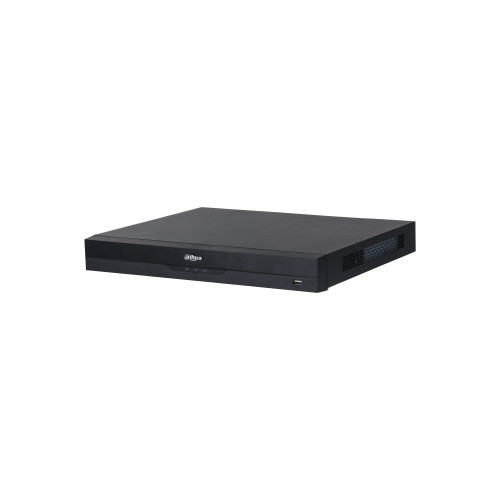
For PoE camera systems, footage typically records to a Network Video Recorder with an internal hard drive, or to a hard drive attached to a PoE-enabled router or NAS device. This keeps everything in one central, tamper-resistant location rather than scattered across individual cameras.
Local recording of this kind tends to be the most cost-effective option over several years, since there are no ongoing subscription fees once the hardware is bought. It also means large amounts of footage can be kept, often several weeks or months depending on drive size and how many cameras are recording continuously.
The trade-off is that the recorder itself becomes a single point of failure. If it is stolen along with the cameras, or damaged in a fire or flood, the recordings are lost too. Positioning the NVR somewhere discreet and not immediately visible from outside the property is a simple way to reduce this risk.
Cloud Storage
Cloud storage sends recorded clips or continuous footage to a remote server over the internet, usually via a subscription service. Because the footage is off-site, it survives even if the camera or recorder is stolen or destroyed, which is its biggest advantage.
Cloud plans also often bundle in extra features such as longer event history, easier remote access from a phone, and sometimes smarter detection processing done on the server rather than the camera itself. The obvious downside is the recurring cost, and the fact that footage quality or retention length is usually limited by whichever plan you have chosen. A reliable internet connection with reasonable upload speed is also needed for cloud recording to work well, which can be a limiting factor in rural areas or with a modest broadband package.
Hybrid Storage: Getting the Best of Both
A growing number of cameras and NVR systems now support hybrid storage, recording locally as the primary method while also sending selected clips or motion events to the cloud as a backup. This approach gives you the low running cost of local storage with the resilience of an off-site copy, without paying for full continuous cloud recording.
It is a sensible middle ground for anyone who wants peace of mind without committing to a subscription for every camera on the property.
Key Factors to Weigh Up
- Budget: local storage has a higher upfront cost but little to no ongoing fee; cloud storage spreads cost over time but keeps adding up.
- Risk of theft or damage: if a camera or recorder is easily accessible to an intruder, off-site backup becomes more valuable.
- Internet reliability: cloud recording depends on a stable connection; local storage keeps working even if the internet drops.
- Retention length needed: local hard drives can often hold weeks or months of footage, while many cloud plans limit history to a set number of days.
- Number of cameras: the more cameras you run, the more expensive per-camera cloud subscriptions become compared with one shared local drive.
- Data protection obligations: if footage may include neighbouring property or public areas, consider how long you actually need to keep it and store no more than necessary.
Practical Recommendations by Setup
For a single battery or Wi-Fi camera watching a front door, a good microSD card is often perfectly adequate, especially paired with occasional cloud backup for key events if the camera supports it.
For a multi-camera PoE system covering a whole property, a dedicated NVR with a surveillance-rated hard drive usually makes the most financial sense, particularly if footage needs to be kept for several weeks.
For anyone who travels frequently, rents out a property, or simply wants extra reassurance that footage cannot be lost along with the hardware, adding cloud backup on top of local recording is worth the modest extra cost.
Conclusion
There is no universally correct storage method, only the right balance for your situation. Weigh up how much footage you need to keep, how exposed your cameras and recorder are to theft or damage, and how much you are willing to pay on an ongoing basis. Many households find that a hybrid approach, recording locally with selective cloud backup, offers the most practical and affordable protection without unnecessary compromise.
 Buying GuidesMotion Detection Zones and Privacy Masks: Setup Guide
 Buying GuidesSecurity Cameras for Holiday Homes and Cottages: Setup Guide
 Buying GuidesSecurity Cameras in Winter: Cold Weather Tips and Fixes